iPhone横幅关闭“国家反诈中心”app通知

 时间:2026-04-26 01:27:14

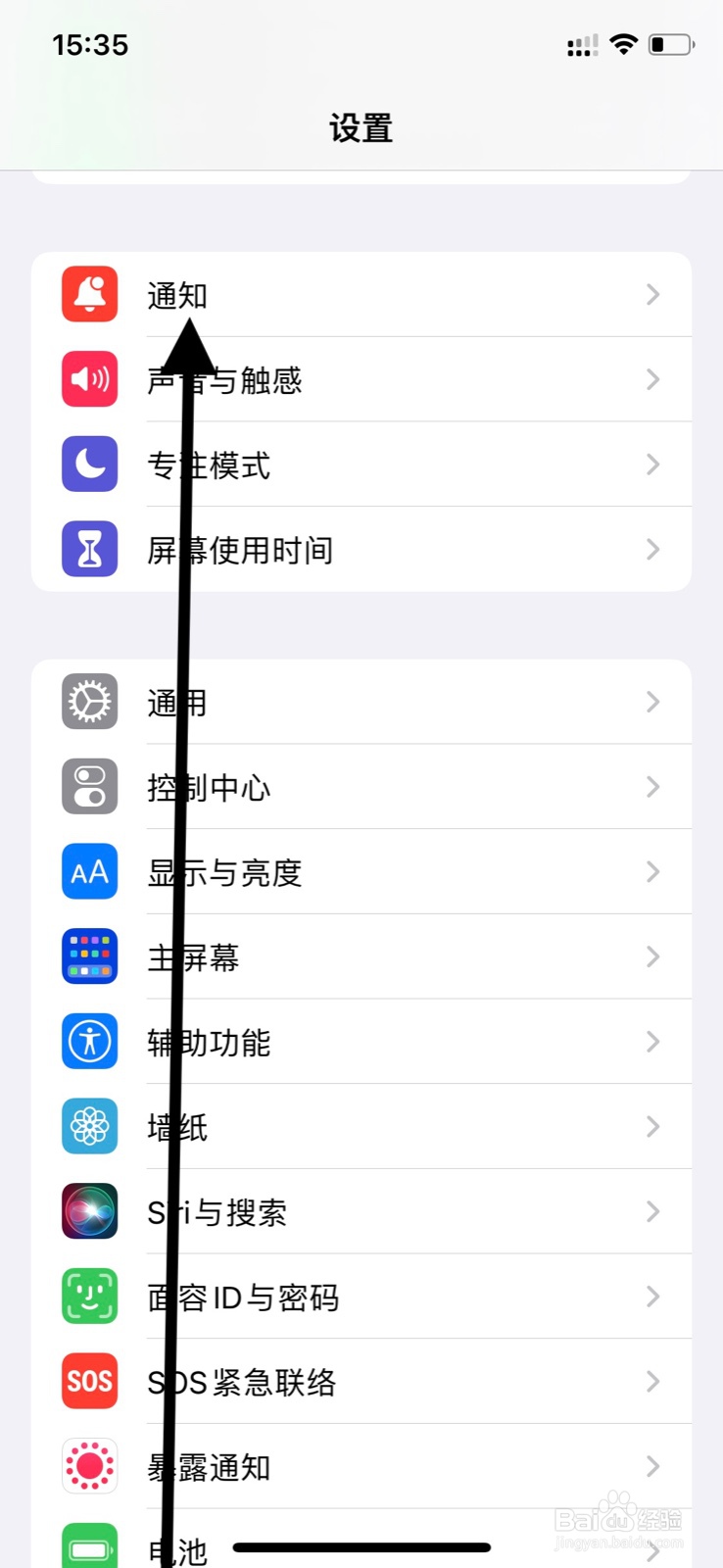
1、第一步

手机设置页面下滑点击显示“通知”。

iPhone横幅关闭“国家反诈中心”app通知

2、第二步

通知显示页面下滑点击“国家反诈中心”。

iPhone横幅关闭“国家反诈中心”app通知

3、最后

页面显示下滑点击“横幅”下方开关圆圈图标,关闭提醒。

iPhone横幅关闭“国家反诈中心”app通知

  • iPhone“国家反诈中心”后台刷新如何关闭
  • 国家反诈中心推送通知怎么关闭
  • iPhone系统相机关闭“国家反诈中心”app使用?
  • iPhone关掉“国家反诈中心”app通知
  • 苹果手机怎么下载欧易app
  • 热门搜索
    汽车购置税怎么算 鸡蛋怎么做好吃 精囊炎是怎么引起的 手脱皮是怎么回事 肾结石是怎么引起的 肛裂怎么办 脑鸣是怎么回事 方的笔顺怎么写 still怎么读 我的世界怎么输入指令