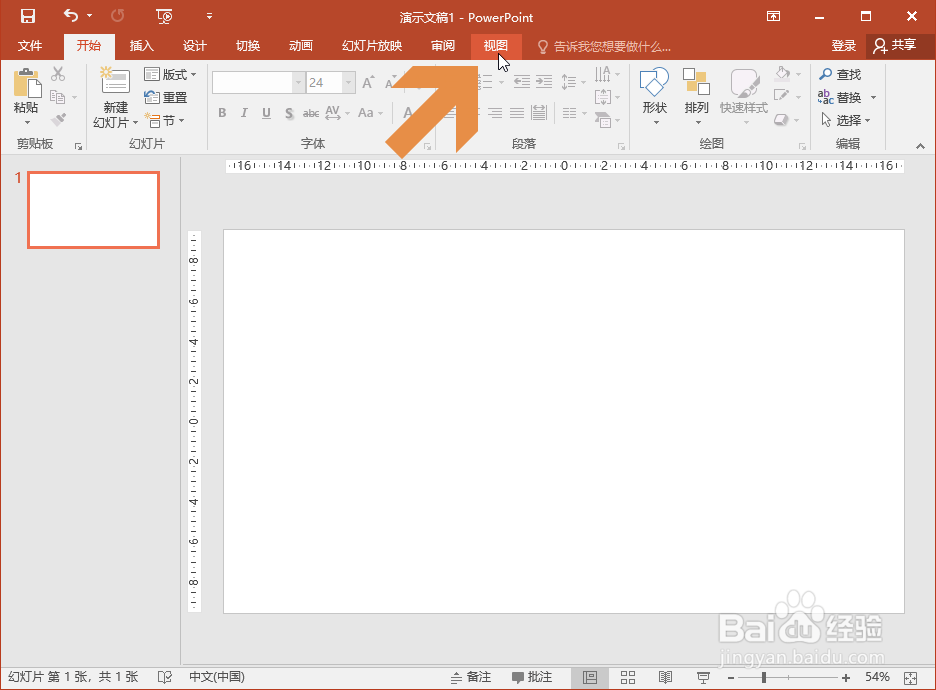
1、点击鼠标,打开PowerPoint 2016的视图选项卡。
2、在视图选项卡中图示的【网格线】选项框中点击鼠标左键,勾选该选项。

3、勾选【网格线】选项后,PowerPoint页面中就显示网格线了。

4、如果感觉网格线的间距不太合适,想调整网格线的间距,可点击显示功能区图示的小按钮。

5、点击按钮后会弹出网格和参考线对话框,点击间距处的下拉框。

6、在下拉列表中选择一个间距选项。

7、选择间距选项后点击确定按钮,网格线的间距就改变了。

时间:2026-04-21 21:43:20
1、点击鼠标,打开PowerPoint 2016的视图选项卡。
2、在视图选项卡中图示的【网格线】选项框中点击鼠标左键,勾选该选项。
3、勾选【网格线】选项后,PowerPoint页面中就显示网格线了。
4、如果感觉网格线的间距不太合适,想调整网格线的间距,可点击显示功能区图示的小按钮。
5、点击按钮后会弹出网格和参考线对话框,点击间距处的下拉框。
6、在下拉列表中选择一个间距选项。
7、选择间距选项后点击确定按钮,网格线的间距就改变了。
